

Arida Desert 10L dehumidifier

⚠️ Important before starting!
This is necessary for the refrigerant and compressor to stabilize again. Starting the dehumidifier too early may cause malfunction or damage to the unit.
For your safety and to reduce the risk of injury or electric shock, follow these warnings carefully:
- Check that the power supply used is 220–240V / 50Hz.
- This appliance is for indoor use only. It must not be used in temperatures above 35°C or below 5°C.
- Do not place the appliance near windows, in bathrooms or near water sources — this may cause electric shock.
- Do not place the device near heat sources. This may cause the plastic to melt or, in the worst case, cause a fire. Do not use the device in explosive or corrosive environments.
- Children aged from 8 years and above and persons with reduced physical abilities may use the appliance under supervision. Children shall not play with the appliance. Cleaning shall not be made by children without supervision.
- Place the device on a horizontal surface to avoid vibration and noise.
- Do not use the appliance on an inclined surface. If it falls over, unplug it immediately. Wait at least 2 hours before using it again.
- Ensure at least 30 cm clearance on all sides.
- Air inlets and outlets must never be blocked.
- Do not spray water on the appliance. This may cause malfunction or electric shock.
- Do not touch the plug with wet hands.
- Always turn off the appliance before unplugging it to avoid electric shock.
- Turn off and unplug the appliance, and empty the water tank when the appliance is not going to be used for a while.
- Do not pull on the cord. This may damage the power cord.
- Do not insert fingers or objects into openings.
- Always disconnect the power before cleaning.
- If the supply cord is damaged, it must be replaced by the manufacturer or similarly qualified persons. Do not attempt to repair the appliance yourself.
- Because the handle is located at the back of the appliance, make sure the water tank is empty before moving the unit — otherwise the water may spill out.
Additional warnings for appliances with R290 refrigerant
- Read the manual carefully before use.
- R290 is environmentally friendly and complies with European environmental directives.
- This appliance contains approximately 35 g of R290.
- Do not puncture or burn the device.
- Maintenance and repairs should be carried out by qualified personnel with experience with flammable refrigerants.
Operation
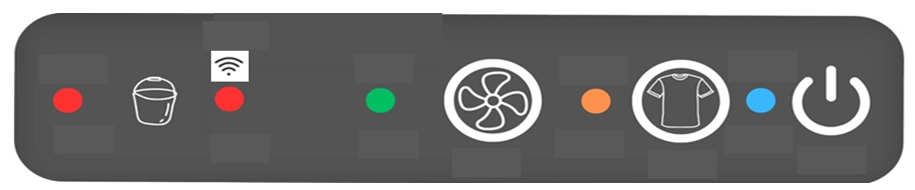
Control panel and buttons
- (ON/OFF): Turn the device on or off.
- (Laundry mode): Activate laundry mode. Hold for 3 seconds to activate WiFi connection.
- (Air purifier mode): Activate or deactivate the air purifier function.
- (WATER FULL): Lights up when the water tank is full.
- POWER LIGHT: Lights up blue when the device is on.
- WATER FULL INDICATOR: Lights up red and stops dehumidification when the tank is full.
How to connect the dehumidifier to WiFi
1. Download Smart Life or Tuya from the App Store or Google Play.
2. Press and hold the "Clothes Dry" button on the dehumidifier for at least 3 seconds to activate WiFi.
3. When the WiFi indicator flashes on the panel, you can connect the dehumidifier to WiFi.
4. Open the app on your phone, tap "+" in the right corner and select "Add Device".
5. The dehumidifier will automatically appear on the screen. If not, select “Small Appliances – Dehumidifier” from the menu and follow the on-screen instructions.
Using the buttons
- When the appliance is connected to power: The device goes into standby.
- Press ON/OFF to start. Default setting is 45% RH.
- Humidity can be adjusted via the app to CO, 35%, 40%, 45%, 50%, 55% or 60%.
- CO = continuous dehumidification.
- Clothes drying mode:
- Press Laundry to activate. The indicator will turn orange.
- Humidity level is automatically set to 35% RH with high fan speed.
- After 6 hours it returns to 45% RH.
- Press again to exit.
- Hold for 3 seconds to activate WiFi – the indicator flashes red during connection, and stays lit when connected.
- Air purifier mode:
- Press Air purifier to activate the function. The indicator will light green.
- The fan runs independently of the compressor.
- Press again to turn off the function.
When the water tank is full
When the tank is full, the appliance beeps and both the power and water indicators light up red.
The unit will stop automatically. Empty the water and replace the tank.
The device continues where it left off.
The compressor will start again after approximately 5 minutes.
Automatic defrosting
At low temperatures, frost can form in the appliance.
The unit will automatically start defrosting and the indicators will light up.
Compressor protection
The compressor has a 5 minute delay between start and stop to protect the machine.
Continuous drainage
Connect a hose to the drain outlet for automatic emptying to a floor drain.
Important: Do not remove the water tank while the hose is connected.
Memory function
The appliance remembers the last setting when the power is disconnected and reconnected. (Hours are not saved.)
Automatic restart after power failure
The unit will automatically restart with the last settings when power returns.
Maintenance and cleaning
Filter
The pre-filter must be cleaned every 2 weeks.
The HEPA filter must be changed every 6 months or as needed.
Cleaning the appliance
- Wipe the device with a damp sponge and then with a soft, dry cloth.
- Do not use alcohol, solvents or immerse in water.
Troubleshooting
| Problem | Checkpoint |
|---|---|
| The device does not start. | Check plug, water tank, and preset level. |
| Poor dehumidification | For kort driftstid, blokkert luftinntak/utløp, for lav temperatur (< 5 °C), eller åpne vinduer/dører. |
| High noise | Uneven placement or dirty filter. |
Specifications
| Parameters | Value |
|---|---|
| Voltage | 220–240V / 50Hz |
| Fuses | PCB T5A / T2A 250V |
| Capacity (30°C, 80% RH) | 10 L/day |
| Power consumption | 215 W |
| Refrigerant | R290 (35g) |
| Water tank | 2 L |
| Goal | 290 × 240 × 480mm |
| Weight | 10.5 kg |