

Arida Pro S13 WiFi & Arida Færder

Safety instructions
Read and understand this safety information carefully before use. Failure to comply with the safety instructions may result in serious consequences for people, property damage and environmental damage. The dehumidifier may only be used to dehumidify atmospheric air. Any other use is considered improper use. Any liability for damage resulting from this is not covered by the product warranty.
Never use the dehumidifier near flammable materials such as alcohol, insecticides, petrol, gas, oxygen containers, etc. A damaged power cord can be dangerous and cause a short circuit or fire. If the power cord is damaged, it must be replaced by a qualified electrician to avoid a hazard.
- The machine must be connected to a grounded outlet.
- Install the machine in a stable position on a solid surface.
- Protect the machine from adverse weather conditions. Do not expose it to liquids.
- Check the power supply voltage to ensure it matches the rated specification of the device before use. Do not use damaged power outlets.
- Do not use extension cords as they may overheat and cause a fire hazard.
- This dehumidifier can be used in ambient temperatures from -15°C to 40°C.
- Do not insert objects into the opening of the machine.
- Never place anything on top of the machine or cover it with any type of material while it is in use.
- Never unplug the power cord without completely turning off the machine – this may damage the product.
- Always unplug the machine when not in use or when moving it. Unplug the power cord from the wall outlet and never pull on the product's power cord.
- Close supervision is necessary when the machine is used near children and pets.
- Do not run the power cord under rugs, and never cover it with textiles or runners. Keep the cord away from areas where it may pose a tripping hazard.
- Never use or store the machine in direct sunlight.
- Do not use chemicals when cleaning the machine.
- To repair the machine, it must be taken to an authorized service center. Repairs carried out by unqualified persons may cause damage to the machine and/or injury to persons and/or property. If the machine is repaired by an unqualified repairer, the warranty will not apply.
- Do not use the dehumidifier without the pre-filter.
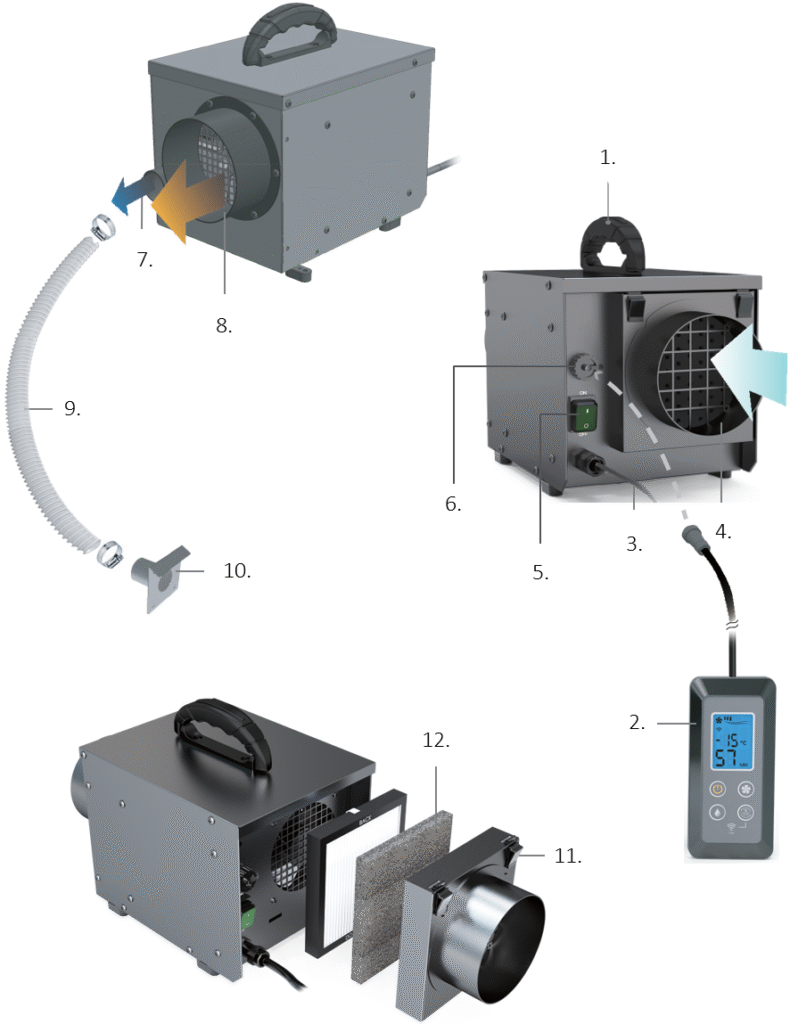
Product description
- Carrying handle
- Control panel
- Power cable
- Air intake
- ON/OFF button
- Control panel connection
- Air outlet wet air
- Air outlet dry air
- 40 mm hose for wet air
- External valve
- Air intake and filter cover
- G4 filter
Product features
- Compact dehumidifier with drying rotor, WiFi and carrying handle.
- The humidity is blown out of the room as humid air, no water container needs to be emptied.
- Wide operating range from -15 °C to 40 °C.
- Robust design for tough conditions and long service life.
- Portable and for fixed installation, easy to install and maintain.
- Washable G4 filter.
- Remote control and full control from your mobile or tablet.
Assembly
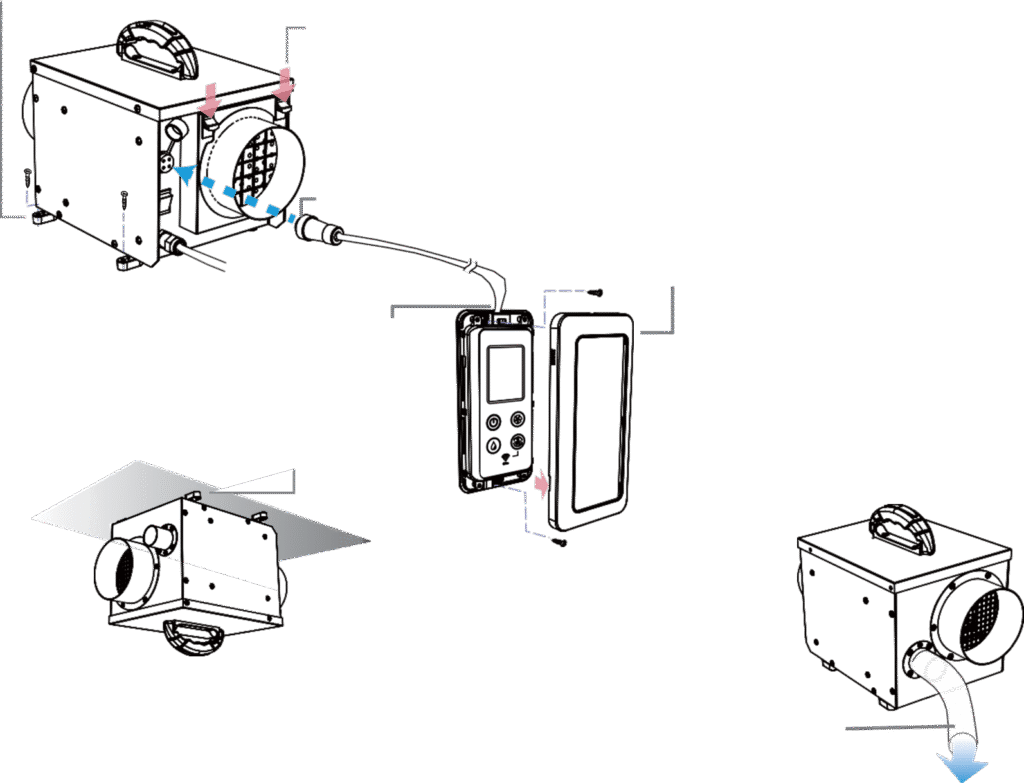
- Loosen the air filter insert by pressing the clips down.
- Connect the control panel to the dehumidifier.
- Mount the control panel on the wall with suitable screws.
- Make sure that the dehumidifier is hung securely when installing.
- NOTE: The moist air must fall outwards in case the water condenses.
Use
NOTE! Make sure that the air filter is installed in the dehumidifier and that any plastic and packaging around the air filter has been removed.
Connect the dehumidifier to power and turn on the switch.
The switch will light up and the machine will run continuously (when no control panel is connected).
To use the control panel, you must turn off the dehumidifier, remove the protection on the connection on the machine and connect the control panel.
Correct use of pipes
Option 1 – Place the dehumidifier in the room to be dehumidified
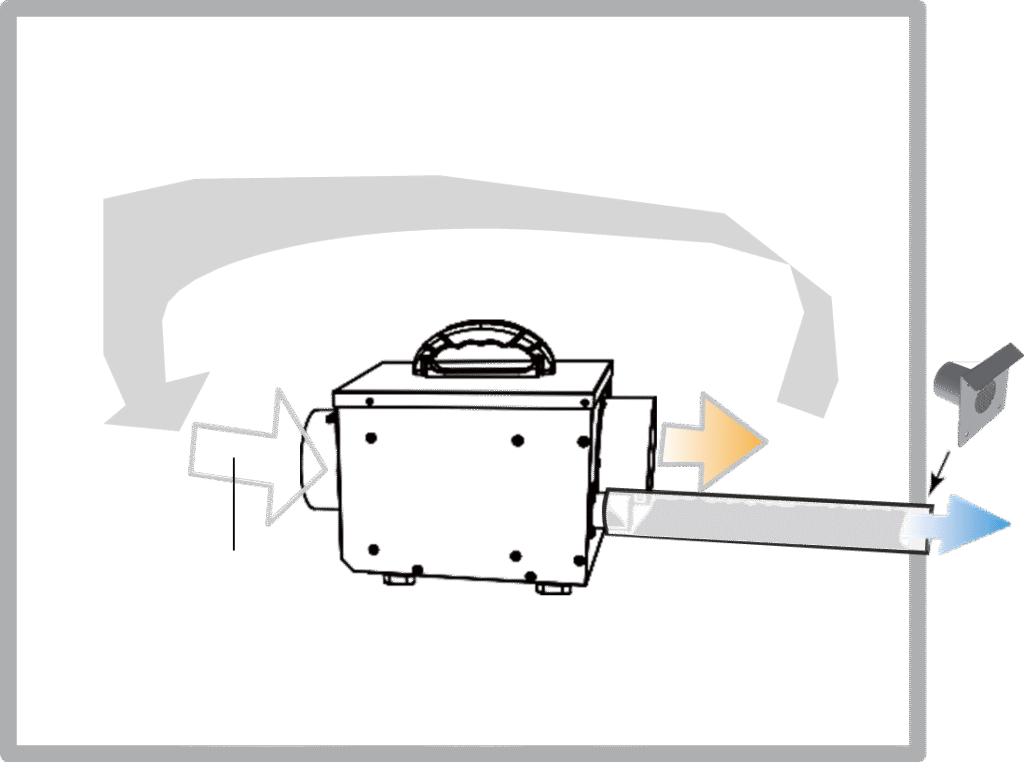
Dry air brought to specific parts of the room by pipes, hoses or open air.
| Place the dehumidifier away from walls or other objects so that the dry air can circulate well throughout the room. If necessary, use hoses for good air circulation. |
Option 2 – Place the dehumidifier outside the room to be dehumidified
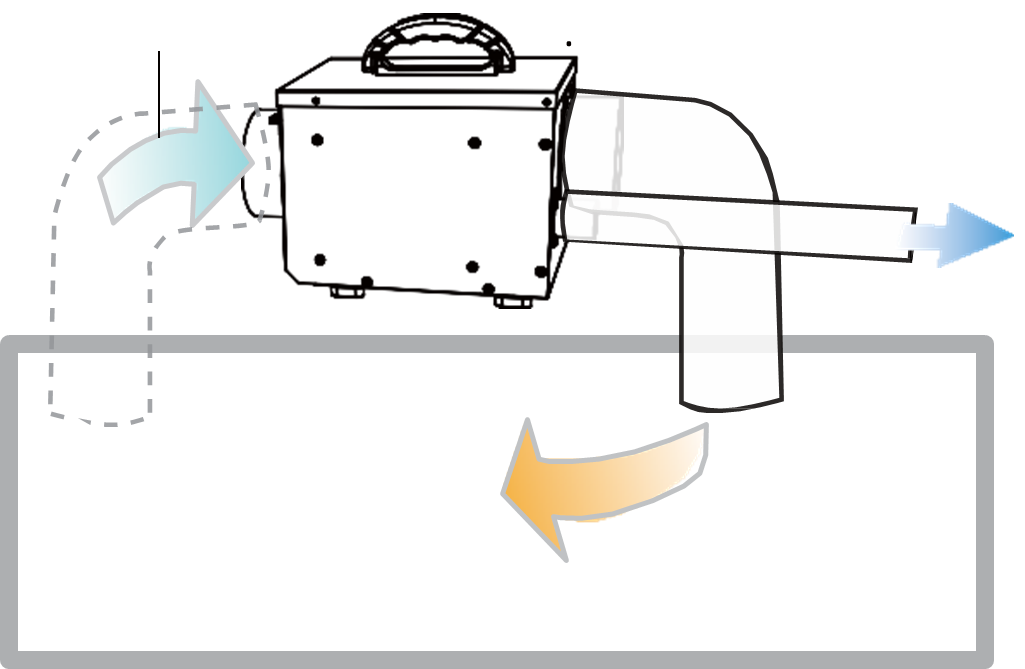
Dry air brought to specific parts of the room by pipes, hoses or open air.
| The humidity sensor is located near the air inlet. Reduce the bend on the air inlet and remove the hose if necessary. |
REMEMBER!
- Pipe lengths should be as short as possible to minimize pressure loss and to reduce the risk of condensation.
- All connections must be airtight to ensure full performance.
- The air pipes must be insulated when there is a risk of frost.
- The air intake should be positioned to avoid the accumulation of dust, rain and snow or contaminants such as engine exhaust, steam and harmful fumes.
- Wet air ducts must resist corrosion and withstand temperatures up to 70 °C.
- The air filters must be used to prevent impurities from entering the machine.
- Regular cleaning and replacement of the air filter is necessary for optimal performance.
Maintenance
NOTE: A clogged air filter will reduce the dehumidification capacity of the machine .
This dehumidifier is designed for continuous use over a long period of time with minimal supervision. Under normal operating conditions, maintenance requirements are minimal. The service interval depends mainly on the operating conditions and the working environment.
| Air filter | Maintenance |
| G4 filter | Clean every 2 months or as needed |
Control panel
WIFI – The icon lights up if a mobile phone or tablet is connected to the dehumidifier, and flashes if it is trying to connect to a new mobile device. If you want to connect to a new mobile device, hold the display setting icon () within 3 seconds.
OFF/ON – Turn the dehumidifier on and off (standby). When turned on, it will run with previous settings. If the dehumidifier is turned on, it will automatically return to the same operation after a power failure.
Humidity – Press the button to change the humidity setting. Numerical value and appears when new setting is selected. Sequence: 30, 35, 40, 45, 50, 55, 60, 65, 70%, CO (continuous).
- During continuous dehumidification, “Cont.” appears in the display.
- Actual humidity is always shown in the lower part of the display.
- “Auto Pause” indicates when the humidity in the room reaches the setting. The machine will stop and dehumidify when the humidity increases to 5% higher than the set value.
Fan speed – Choose between Auto, Low or High fan speed.
- Low: The fan operates at low fan speed and the heating element at low power.
- High: The fan operates at high fan speed and the heating element at high power.
- Auto: Arbeider i “Høy” når målt fuktighet er <10% høyere enn innstilt verdi, og “Lav” når målt fuktighet er >5% høyere enn innstilt verdi.
Display setting – Choose whether to display temperature (°C or °F) or humidity (RH).
Error message – Icon and “E” indicate a fault with the dehumidifier. See “Troubleshooting” in the user manual.
Connection to control panel
- Remove the display cover
- Pass the strip through one hole, up the other hole and partially lock it as a loop
- Pass the cable through the loop and connect it to the control panel
- Tighten the strip, cut it to fit the lock on the strip and close the screen cover.
Connecting to WiFi
Preparation
- Connect the dehumidifier to power.
- Make sure your phone is connected to 2.4 Ghz Wi-Fi. Your mobile phone and smart device must be within good signal strength range of your WiFi router.
Download the app
- Download the app by searching "Tuya Smart" or "Smart Life" on the App Store (Apple) or Google Play (Android) for mobile, and install it.
- Open the app, sign up or log in to your account.
Connect the machine to WiFi
- Start the dehumidifier with the “ON/OFF” button. If another smart device has been connected to the machine previously, the machine will automatically search for this device.
- Start a new pairing of the phone to the machine. This will also cancel any original pairings. You can grant access to multiple people under “Home Management” in your user profile.
- Press and hold the WiFi button on the machine for 3 seconds to activate WiFi connection. The WiFi icon (
) will flash quickly.
From the app's homepage, tap "Add device" or tap + in the top right. - Select your “Dehumidifier (wifi)” from the device menu and complete the connection.
- The WiFi icon will light up on the dehumidifier when the connection is complete and the dehumidifier has contact with the mobile phone.
Troubleshooting
| Problem | Possible cause | Solution |
| Reduced performance | Humidity setting too high. | Adjust the humidity setting to a lower value. |
| The air filter is clogged. | Clean or replace the air filter. | |
| The installation is incorrect. | Ensure good air circulation throughout the room, and close all supplies of outdoor air (ventilation hatches, air slots, valves, etc.). | |
| The machine does not dehumidify and “Auto Pause” flashes. | The machine will stop dehumidifying when the humidity reaches the setting. The unit will periodically run a few minutes of fan circulation to confirm the humidity in the room. | This is completely normal. The machine will start dehumidifying when the humidity is 5% higher than the setting on the machine. |
| E8 or E9: The ambient temperature is outside the machine's operating range. | The machine will start dehumidifying when the temperature is below 38°C or above -13°C. | |
| E3 or E5: Safety protection against internal overheating. | Unplug the dehumidifier. Check that the air inlet, filters and air outlet are not covered. Clean any obstructions or replace the air filter. Wait at least 30 minutes before restarting the machine. | |
| Other E-error message: Internal sensor error. | Contact your dealer if the problem persists. |
If the problem persists, contact your dealer. Do not disassemble or repair the dehumidifier yourself.
Technical data
| Voltage | 220 – 240V~, 50Hz |
| Power consumption | 550W |
| Capacity | 13 L/day |
| Operation | Control panel + WiFi |
| Air filter | G4 |
| Working temperature | -15°C ∼ 40°C |
| Airflow dry air | 155CMH |
| Airflow humid air | 25CMH |
| Hose dimension humid air | Ø40 mm |
| Hose dimension dry air | Ø123 mm |
| Hose dimension intake air | Ø123 mm |
| IP rating | IP22 |
| Net weight | 7.2 kg |
| Gross weight | 9 kg |
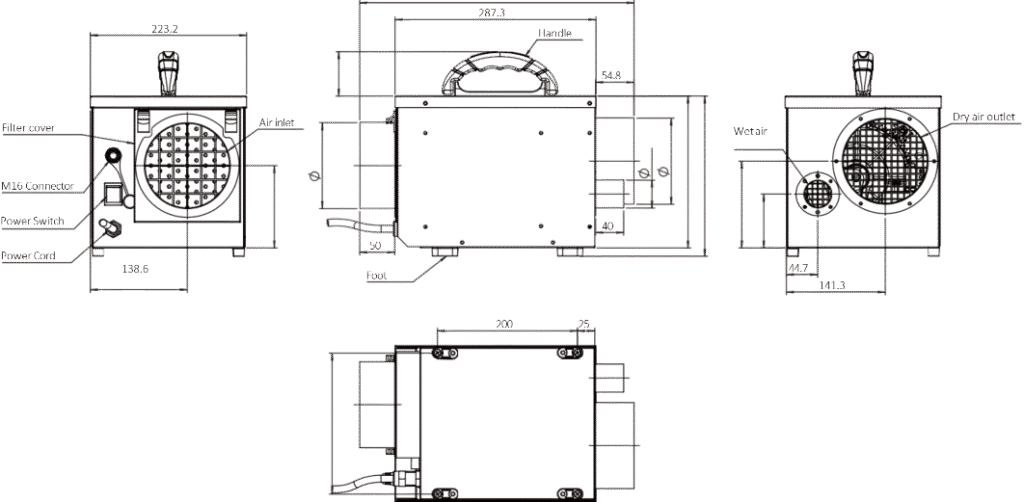
| Product dimensions | W220 x D285 x H225 mm |