

Arida Pro S25 WiFi dehumidifier

- Sorption technology – easy and effective
- High efficiency, no water tank
- Works from -15°C to 40°C
- Robust metal housing, IP24
- Easy wall mounting, low maintenance
- Can be installed at almost any angle, even upside down
- Optional carrying handle
- Washable antibacterial pre-filter + HEPA filter
- Wired remote control + Wi-Fi control
Please read this user manual carefully before using the product. Keep this manual for future reference.
This appliance is not intended for use by persons (including children) with reduced physical, sensory or mental capabilities, or lack of experience and knowledge, unless they have been given supervision or instruction concerning use of the appliance by a person responsible for their safety. Children must be supervised to ensure that they do not play with the appliance.
Safety instructions
Follow these safety instructions carefully. Failure to comply could result in serious health hazards, property damage or environmental damage.
⚠️ Warning!
Never use the dehumidifier near flammable materials such as alcohol, insecticides, gasoline, gas, oxygen, etc.
A damaged power cord can be dangerous and cause a short circuit or fire. If the power cord is damaged, it must be replaced by a service technician or a similarly qualified person in order to avoid a hazard. The device must be connected to an earthed socket.
- Install the dehumidifier in a stable position on a solid surface.
- Protect the dehumidifier from weather and liquids.
- Check that the voltage matches the dehumidifier's specifications. Do not use damaged sockets.
- Do not use an extension cord and do not place the power cord under carpets or rugs (risk of overheating and fire).
- Only use the dehumidifier in ambient temperatures between –15°C and 40°C.
- Do not insert objects into the openings of the dehumidifier.
- Do not place anything on top of the dehumidifier or cover it during use.
- Do not unplug the power cord without turning off the dehumidifier as this may damage the internal components.
- Always unplug the dehumidifier when it is not in use or when it is to be moved.
- Supervision is necessary when the dehumidifier is used by or near children and pets.
- Do not use or store the dehumidifier in direct sunlight.
- Do not use chemicals when cleaning.
- Never repair the dehumidifier yourself – use an authorized service technician. Improper repair can cause a fire hazard.
- Never use the dehumidifier without an air filter.
- The dehumidifier can be used by children aged from 8 years and above and persons with reduced physical, sensory or mental capabilities if they have been given supervision or instruction concerning use.
- The dehumidifier must be installed in accordance with current electrical regulations.
Component descriptions
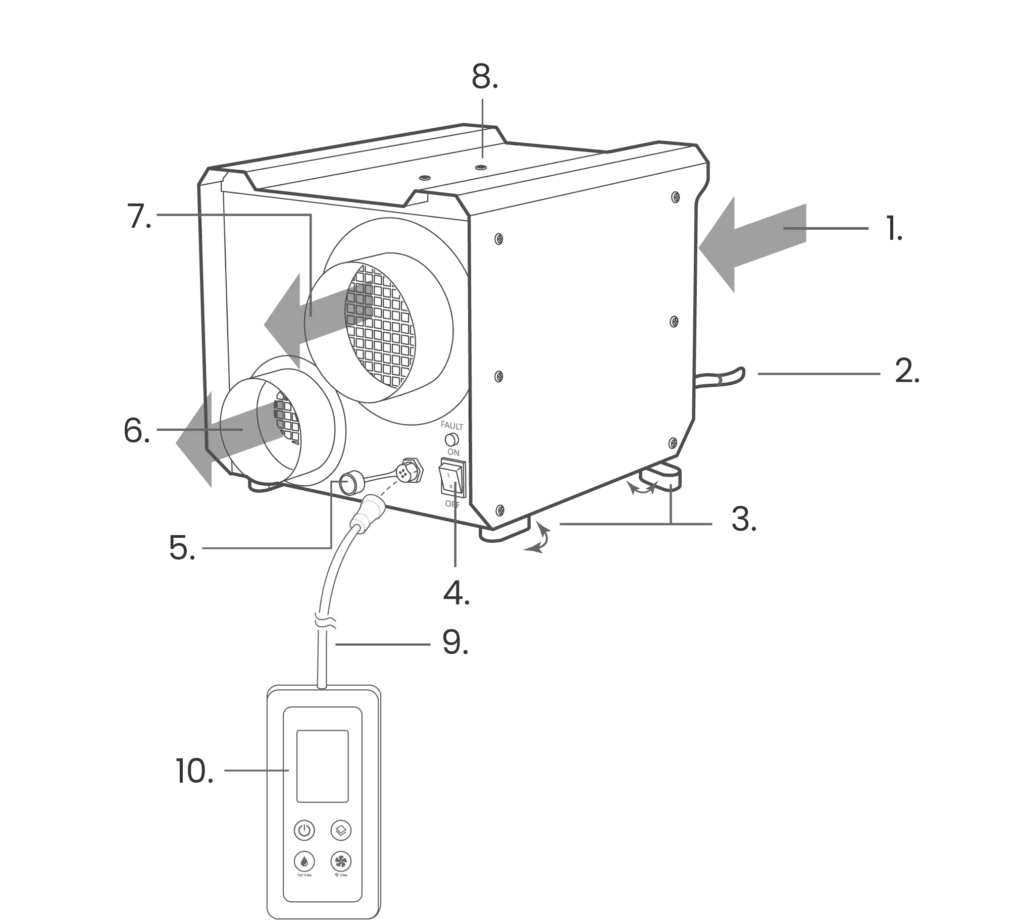
- Air intake
- Power cable
- Rotatable feet for easy installation
- ON/OFF switch
- Connection to control panel
- Air outlet for wet air
- Air outlet for dry and filtered air
- Attachment for carrying handle (accessory)
- Connection cable (15 meters)
- Wired operating panel (WiFi compatible)
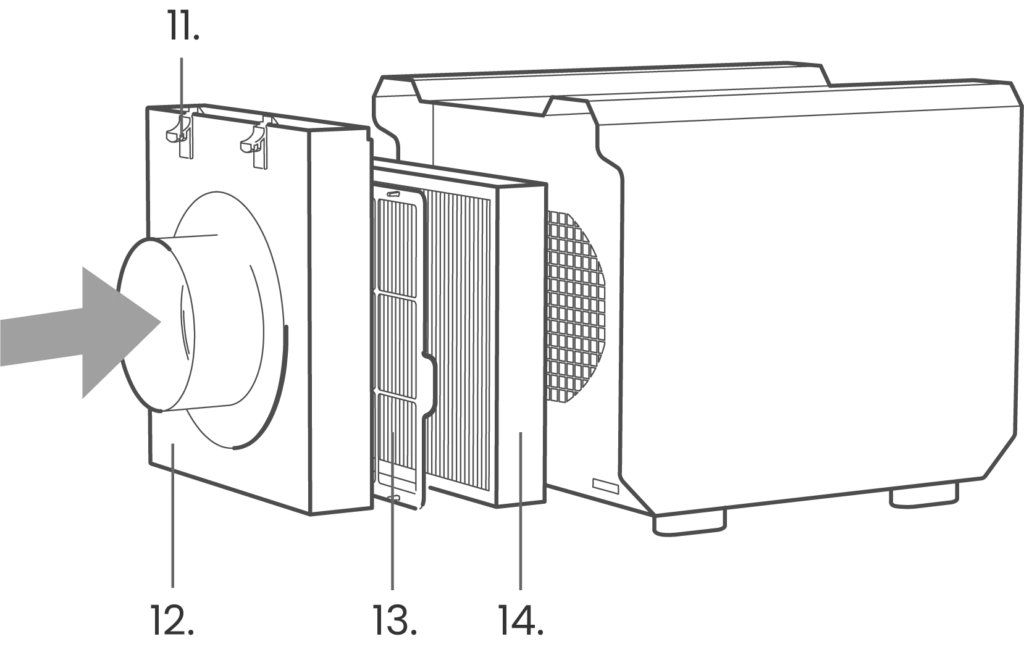
- Filter cover locking mechanism (push down to open the filter cover)
- Air intake and filter cover
- Antibacterial pre-filter
- HEPA 11 filter
Working principle
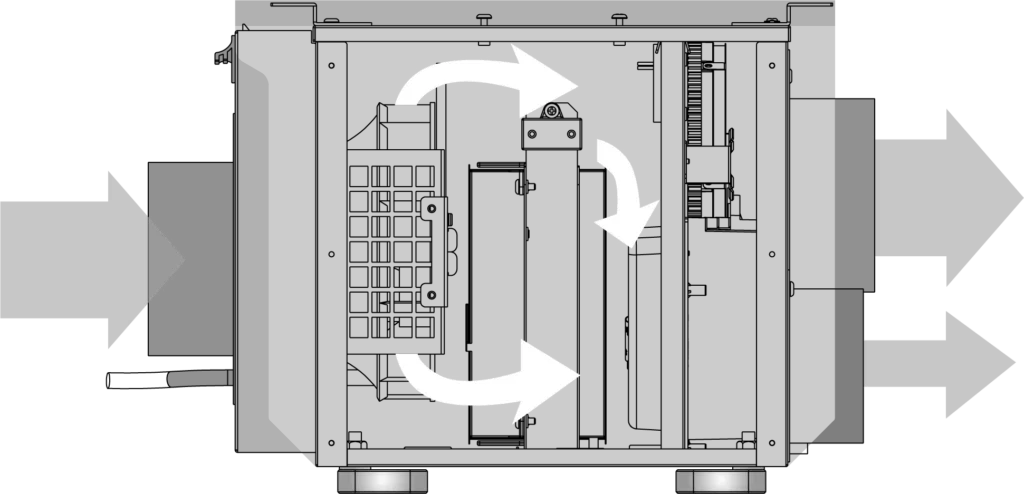
Air is sucked in via a filter by a centrifugal fan.
The pressurized air passes through a sorption rotor where moisture is absorbed, and dry air is blown out of the main outlet.
The rotor rotates slowly through a heated zone, where the moisture evaporates and is blown out as wet air. The rotor is then ready for new moisture absorption.
Installation
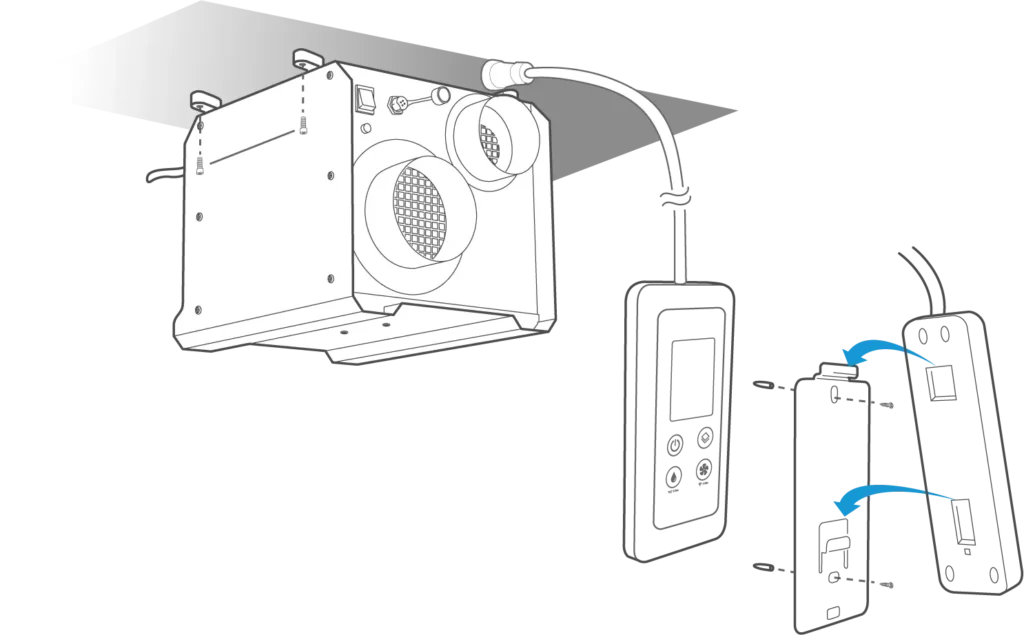
Placement on floor or shelf
Place the dehumidifier on a flat and stable surface, such as a shelf.
Swing out the feet and screw them in so that the dehumidifier cannot move.
Wall or ceiling mounting
Swing out the four feet at the bottom of the dehumidifier and secure the dehumidifier sufficiently.
This dehumidifier can be hung on the wall or ceiling if desired.
Installation of control panel
Screw the wall bracket in place with two suitable screws. Hook the control panel over the wall bracket, ensuring that it is sufficiently secure.
⚠️ Warning!
Use of pipes
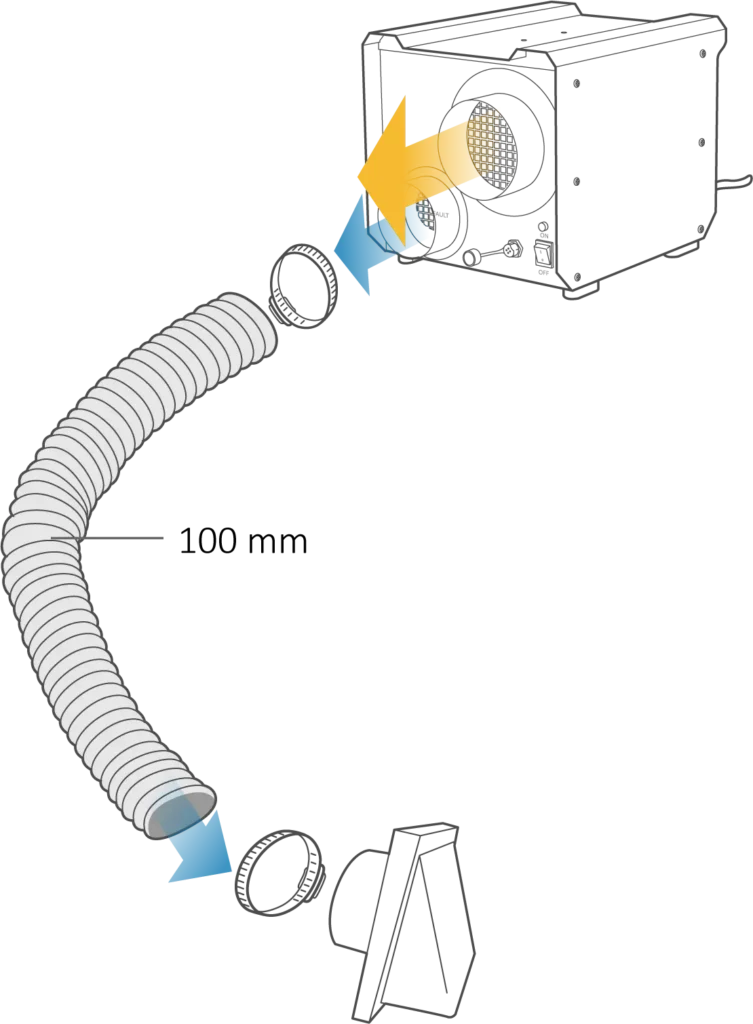
A) Place the dehumidifier in the room to be dehumidified
Extract humid air from one end of the room.
Dry air should be directed to specific areas away from where dry air is blown out, using pipes/hoses.
Moist air must be led out of the building.
Always keep the pipes as short as possible to prevent pressure drops and to maintain good capacity.
B) Place the dehumidifier outside the room to be dehumidified
Use poppet valves and exhaust valves to supply dry air and extract moist air.
Place the control panel in the room to be dehumidified.
Extract humid air from one end of the room.
Dry air should be directed to specific areas away from where dry air is blown out, using pipes/hoses.
Moist air must be led out of the building.
Insulate the pipes if there is a risk of frost.
Control panel
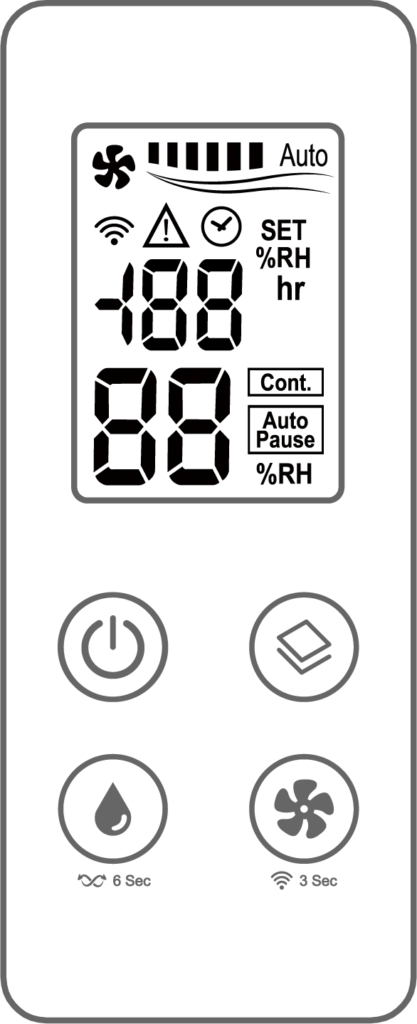
OFF/ON
Press to turn the device on or off. After the device is turned on, it will check within 3 seconds whether an external display is connected:
– Without external display: Starts in Co mode (10%) with high fan speed and heating element activated
– With external display: Resumes last state
When first used, the default setting is OFF , 65% humidity , and Auto mode .
Mode
Press to cycle through the operating modes. The selected mode will flash and be confirmed after 3 seconds of no input.
Auto (Au) → Ventilation (VE) → Normal (No) → Boost (bo) → Winter (UU) → Anti-Mold (NN) → back to Auto.
– Auto (Au) : Automatically adjusts fan speed based on humidity. When the room temperature is lower than the setting, the unit enters energy-saving Auto-Pause and starts 2 minutes of airflow every 30 minutes
– Ventilation (UE) : Humidity and fan speed can be adjusted. Auto-Pause is not activated (the fan runs continuously without heating element when the desired humidity is reached).
– Normal (no) : Allows manual adjustment of humidity and fan speed. When the humidity reaches the target, the unit goes into Auto-Pause and runs a periodic airflow cycle.
– Boost (bo) : Runs continuously for 4 hours at high fan speed and maximum drying effect (“Co” mode). In this mode, neither humidity nor fan speed can be adjusted. After 4 hours, the device automatically switches to Normal mode. The app only shows the humidity from the previous setting.
– Winter (UU) : Runs at fixed low fan speed (fan speed cannot be adjusted). Humidity can be set manually.
– Mold Mode™ : Prevents mold growth with adjustable fan speed and system-controlled humidity. Above 15°C, humidity is fixed at 65%. At 15°C or lower, it increases by 1% for every 1°C drop in temperature, up to a maximum of 80% (even below freezing). Humidity cannot be manually adjusted, and the unit goes into Auto-Pause when the preset level is reached. The app only shows the humidity from the previous setting.
Humidity setting
This setting is disabled when using Boost and Mold Mode™ . Press to adjust the desired humidity.
The values scroll through in the order: 30% → 35% → … → 80% → Co (continuous mode, 10%) → back to 30%.
Long press (6 seconds) to change sensor – In = internal sensor in dehumidifier, Ou = external sensor.
Fan speed
This setting is only available when using Normal, Ventilation, or Mold Mode™.
Press to cycle through the fan speeds: Low (low fan speed) → Medium (medium fan speed) → High (high fan speed) →….
The meaning of the icons
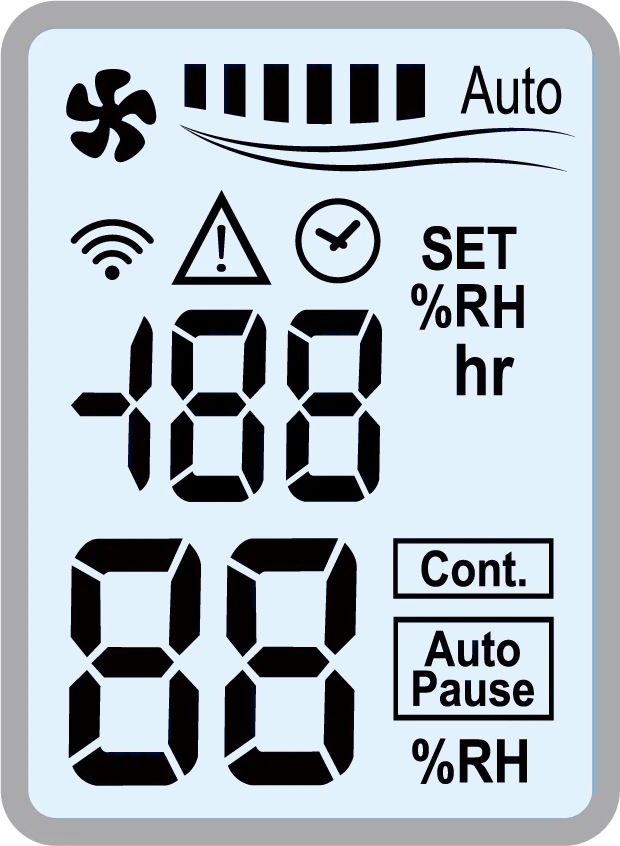
| Symbol | Importance | Description |
 | WiFi connection | Lights up constantly when the dehumidifier is connected to WiFi, flashes when the dehumidifier is searching for WiFi. |
 | Fan speed | Indicates selected fan speed. |
 | Error message | Lights up when the dehumidifier detects an abnormality. |
 | Hours | Once WiFi is paired and a timer is activated via the app, the symbol will remain lit in the display until the countdown is finished. The set time is displayed briefly while it is being set, then the display returns to showing The countdown and timer status can be monitored at any time in the app. (Time interval for hours is from 1 hour to 7 days). |
 | Selected humidity | Lights up to indicate the set desired humidity. |
 | Continuous operation ("CO") | Indicates when the heating element is active. |
 | Humidity OK | Indicates that the desired humidity level has been reached. The dehumidifier stops and starts the fan periodically to measure the humidity level in the room. Dehumidification starts again when the humidity level in the room is 5% higher than the set value. |
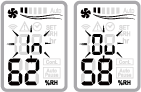
| Symbol | Importance |
| In | Sensor in control panel activated |
| Oh | Sensor in the dehumidifier activated |
Selected sensor
Hold the humidity setting button for 6 seconds to switch between sensors.
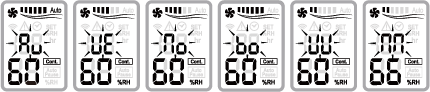
Selected mode
When using the mode button, the selected mode will flash to indicate which mode is activated.
Connecting to WiFi
How to activate WiFi on the dehumidifier
1. Download Tuya or Smart Life from the App Store or Google Play.
2. Make sure your router provides 2.4 GHz internet and that the internet coverage is stable and good where the dehumidifier will be located.
3. Press and hold the fan speed button for 3 seconds to start WiFi connection. Now the dehumidifier will enter pairing mode for 3 minutes.
4. Tap “+” → “Add Device” in the app. Now the dehumidifier will normally appear on the screen, if not, tap “Small Home Appliances” → “Dehumidifier (BLE+Wi-Fi)”.
5. Confirm that you have activated connection mode on the dehumidifier, press "Next" and wait for the app to find the dehumidifier.
6. The WiFi icon on the dehumidifier will be constantly lit when the connection is complete.
If the dehumidifier has previously been connected to the internet, it will now reset the connection and start a new connection when the button is held down.
You can add multiple users to manage the dehumidifier under "Family Management".
WiFi is required for app control and timer settings.
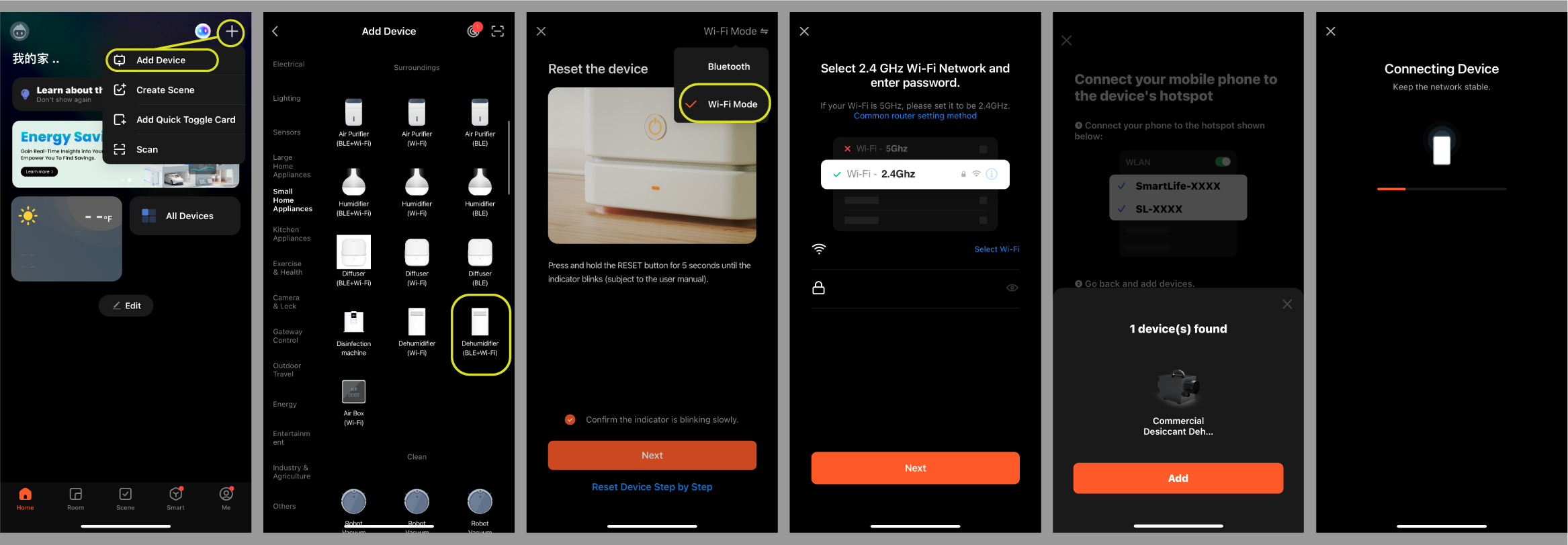
How to use the app
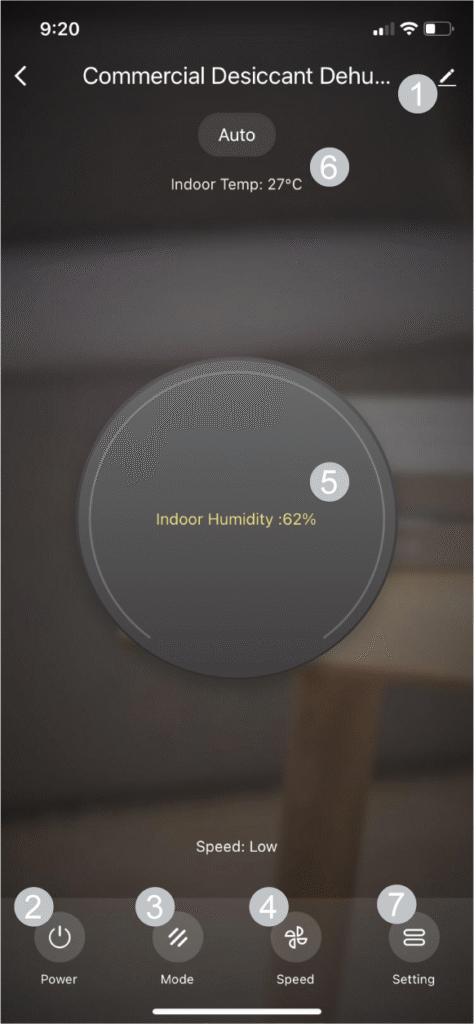
- Device settings
Change the name of the dehumidifier in the app. - OFF/ON
Turn the dehumidifier on or off. - Mode selection
Select the desired mode: Auto, Ventilation, Normal, Boost, Winter or Mold Mode™ - Fan speed
Select the desired fan speed: Low, Medium or High. - Indoor humidity
The value of the humidity (%RH) that the sensor measures. - Indoor temperature
The value of the temperature that the sensor measures. - More settings
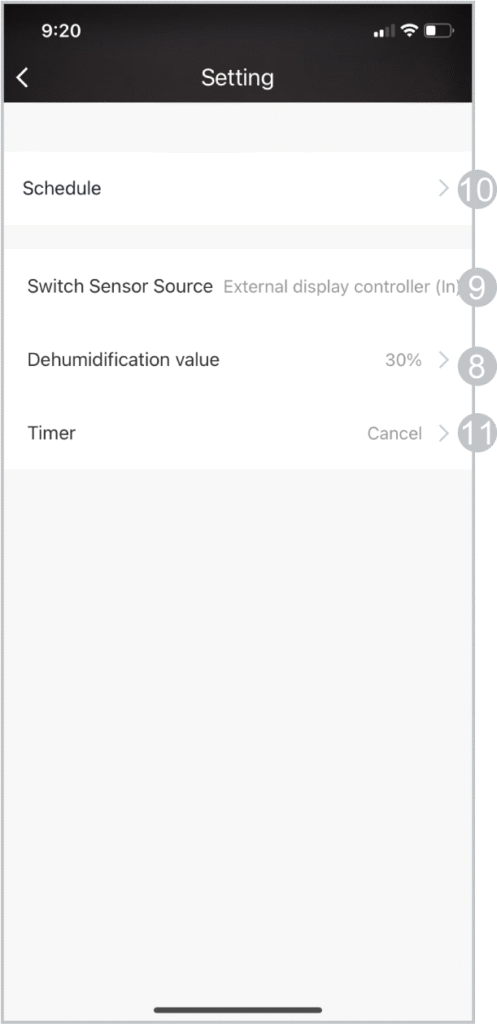
Click to open more settings. - Selected humidity
Select a desired humidity level between 30% to 80% (5% increments), or use "Continuous" to activate continuous dehumidification. - Selected sensor
Choose how you want to measure the humidity, either sensor internally (In, in the control panel) or externally (Ou, in the dehumidifier). - Planning
Set the on/off timer. - Hours
Set when the dehumidifier should turn off (1-23 hours or 1-7 days).
The remaining time of the timer is displayed in the app. The timer will reset if the connection to WiFi is lost.
Maintenance
• Pre-filter: clean every 2 months or more often if there are a lot of impurities in the air.
• HEPA filter: replace after 6 months or more often if there are a lot of impurities in the air.
• Check the unit, panel, sensor and power cord for damage regularly.
Troubleshooting
| Problem | Possible cause | Solution |
|---|---|---|
| The dehumidifier seems to have lower performance | The humidity setting is higher, so it works less | Set lower humidity |
| The filter is blocked and reducing performance | Clean or replace the filter(s) | |
| The unit does not dehumidify and “Auto Pause” is displayed | The unit will stop dehumidifying when the humidity reaches the setting. The unit will periodically run the fan for a few minutes to confirm the humidity | This is normal. The unit will restart when the humidity increases to 5% above the setting. |
| The dehumidifier stops and displays an error symbol and “E” message. | LL or HH: Ambient temperature is outside the operating range – above 40°C or below –15°C | This is normal. The unit will resume dehumidification when the temperature is below 38°C or above –13°C. |
| E3 or E6: Safety protection due to internal overheating | Unplug the unit. Check if the air inlet, filter or air outlet is blocked. Remove any obstructions. Wait at least 30 minutes before restarting. | |
| Other E-codes: Internal sensor error | Contact service if the error recurs. | |
| The dehumidifier stops and displays “ — ” | Temperature and humidity sensor error | Contact service if the error recurs. |
If the problem still occurs, please contact your point of sale or authorized service partner.
Specifications
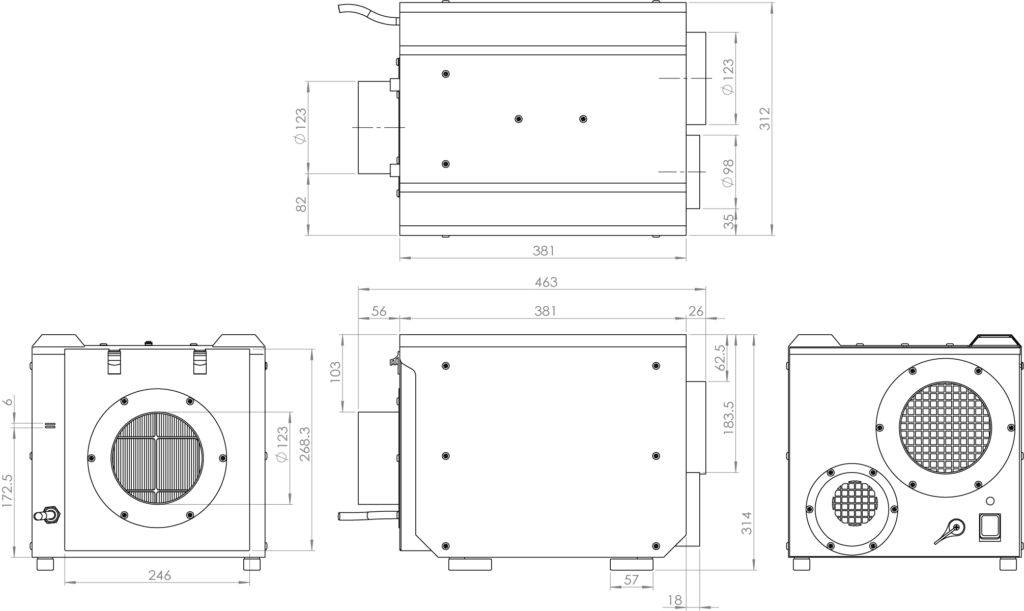
| Model | Arida Pro S25 WiFi |
| Voltage/frequency | 220–240V~, 50Hz |
| Power consumption (H) | 850W / 590W / 320W (@230V) |
| Capacity (30°C, 80% RH) | 25 l/day |
| Steering | Electronic mechanical panel, wired remote control, WiFi |
| Filter | Washable antibacterial pre-filter + HEPA 11 filter |
| Working temp. | –15°C to 40°C |
| Dry air flow | 200 CMH / 100 Pa or 150 CMH with HEPA |
| Humid airflow | 30 CMH / 50 Pa |
| Pipe connection (humid air) | Ø100 × L48 mm |
| Pipe connection (dry air) | Ø125 × L56 mm |
| Pipe connection (inlet) | Ø125 × L56 mm |
| IP rating | IP24 |
| Weight | 14.3 kg |
| Dimensions (mm) | W312 × D463 × H314 |